Hammer Editor: A Love Letter
My thoughts and review on the free and open-source creative writing app, Hammer Editor

A lot of the things I've added to my homelab have been more for learning and experimentation than actual tools I'd classify as useful or as improving my daily life. At the start of my homelab I installed the things everyone has heard of like Jellyfin and Immich, as well as my chosen music streaming server Airsonic, but since then most new apps and services that I've tried have made minimal impact on my life.
That isn't to discount the value or quality of them, I love all of the stuff I'm running. They are just infrequently used or are more for experimentation. That's why finding the Hammer editor was so huge for me.
What is Hammer?
Their tagline "a simple tool for building stories" really does capture it perfectly. It is a writer's tool for the creation and management of written stories. The primary use case is definitely novel-style writing as it doesn't have any features specific to something like screenplays, but I imagine the features it does have (and the free, open-source aspect) is still enough of a draw that having to manually style things like dialogue or stage direction would be a fair price to pay in many cases.
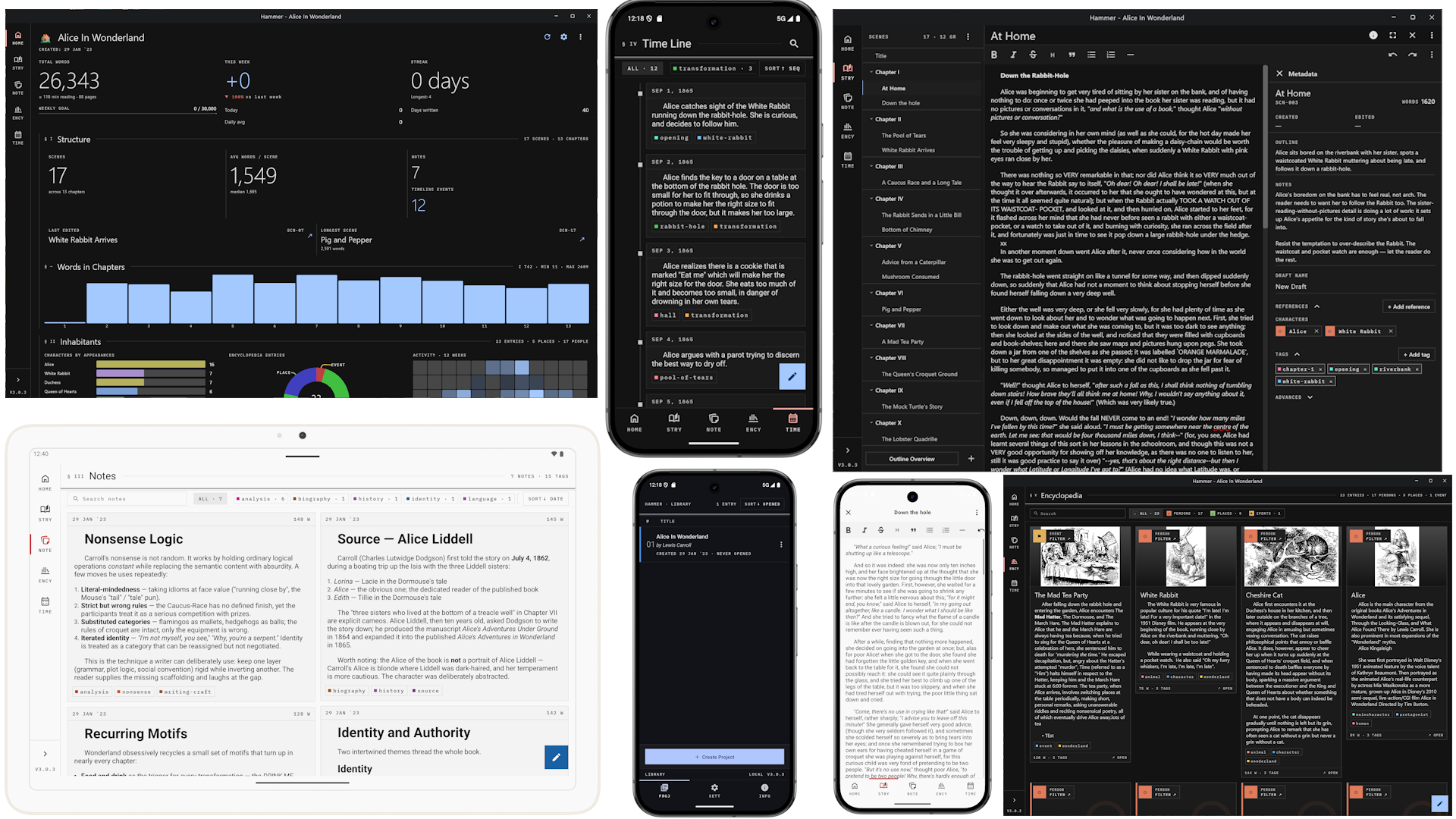
My primary use of it is for creative writing of longer varieties (i.e. multiple parts and chapters). I am not going to pretend like I am writing real novels, the things I write may never see the light of day because I just enjoy doing it as a creative outlet, but the lengths of my writing projects are comparable to a novel.
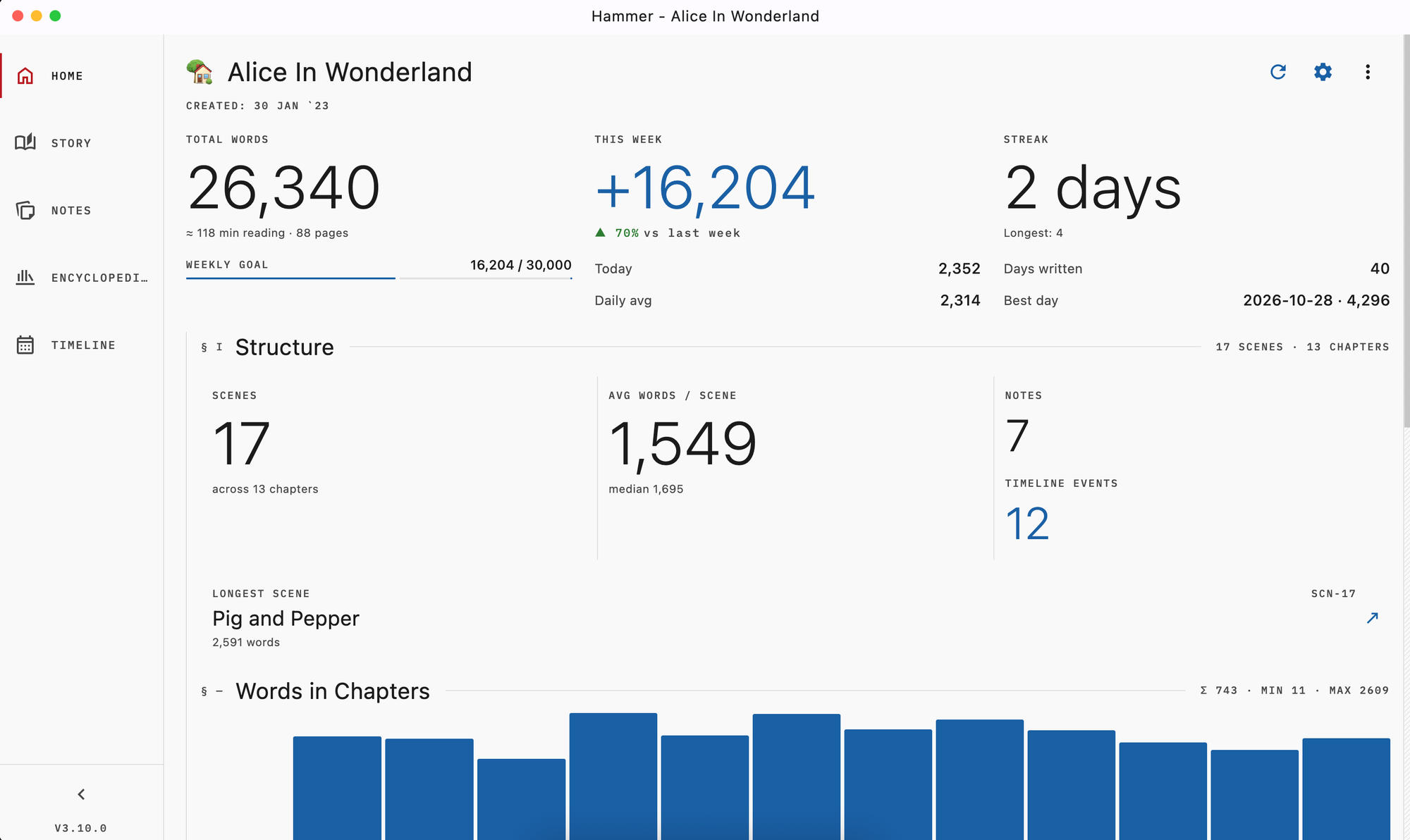
The main reason the developer seems to have made it was to address the fact that tracking your writing progress by word count can be demotivating as you could spend hours editing and by the end of a writing session actually have ended up with less words than you started with, even though you wrote (and re-wrote and re-wrote) hundreds or thousands. The app has a smart dashboard that tracks your total words written, even if they were eventually deleted. It also has a lot of other cool features that it can track, some of which I'll briefly cover later.
To me the primary reason it won me over is the self-hostable nature of it. While there is the ability to just use it as an offline app on your phone or computer, you can instead set up a server that your desktop/phone apps connects to which enables you to access your writing projects on any of your devices. With all of the invasive AI features being added into things like Google Docs I don't trust any of them with my creative writing, but I do want the ability to write, view, and edit things without being at home or carrying a USB flash drive at all times.
My Top Features
There are several features that it comes with that I haven't fully made use of yet, but the little amount I have experimented with them has proven they are quite useful.
Encyclopedia
The first is an encyclopedia for each project that lets you create entries for characters, locations, things, and general concepts in your story that you want to be able to refer back to. This is a huge help with any large world building but even for smaller things like not wanting to forget that you already mentioned a character's birthday in a previous chapter.
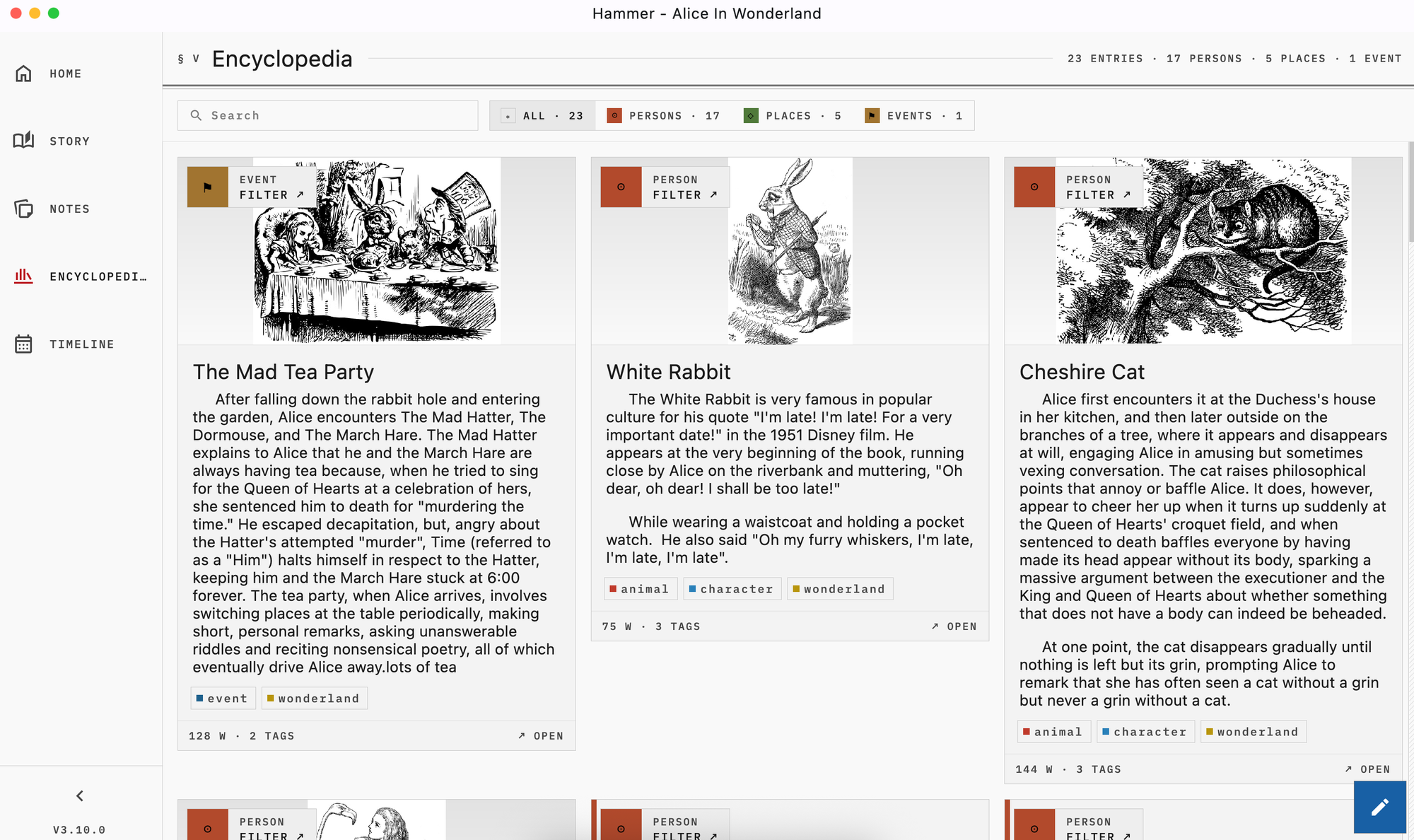
The feature is pretty smart such that it can identify and link to every chapter where the entity is mentioned. So if you enter your a character named Dylan into the encyclopedia, in addition to being able to write anything you choose in the body text of the entry, it will automatically make a list of every chapter / scene where the name Dylan appears. I haven't experimented with any weird edge cases (like does naming a character "Will" mean that any use of the word will will confuse the encylopedia?) but so far it has automatically picked up every character and location I've entered into it.
Timeline
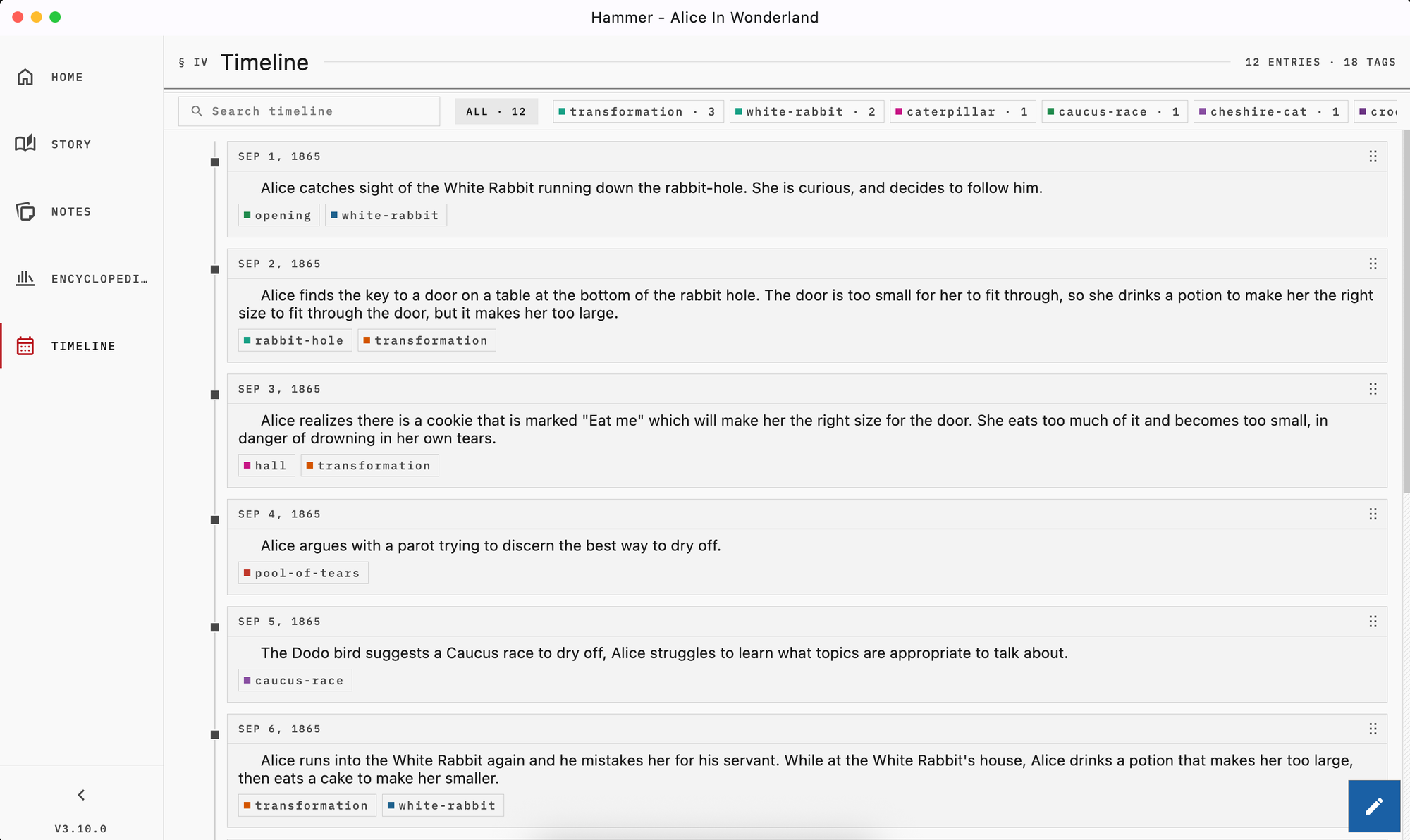
The other major feature I've found invaluable to planning out my writing has been the timeline. It is pretty straightforward, just a list that displays events in the order you choose them to display. There is no automatic aspect to it with identifying events from what you write or in how it sorts the events you enter. It is fully manual but I prefer it that way especially since any story that doesn't take place using our current method of time measurement on Earth would likely become messy if it was trying to automatically sort events.
Tags
As both of the previous screenshots show, there is a tagging feature that can be used across all of the entries. Whether you tag chapters / scenes in the actual story or different entries in your notes, encyclopedia, or timeline these tags allow you to easily sort and find by custom attributes that you can create as needed.
Other Features
You can also see a notes tab on the sidebar of the screenshots which is also a straightforward feature that can be helpful when you need to keep track of something that doesn't belong in any of the other sections, or as a preliminary place to dump thoughts.
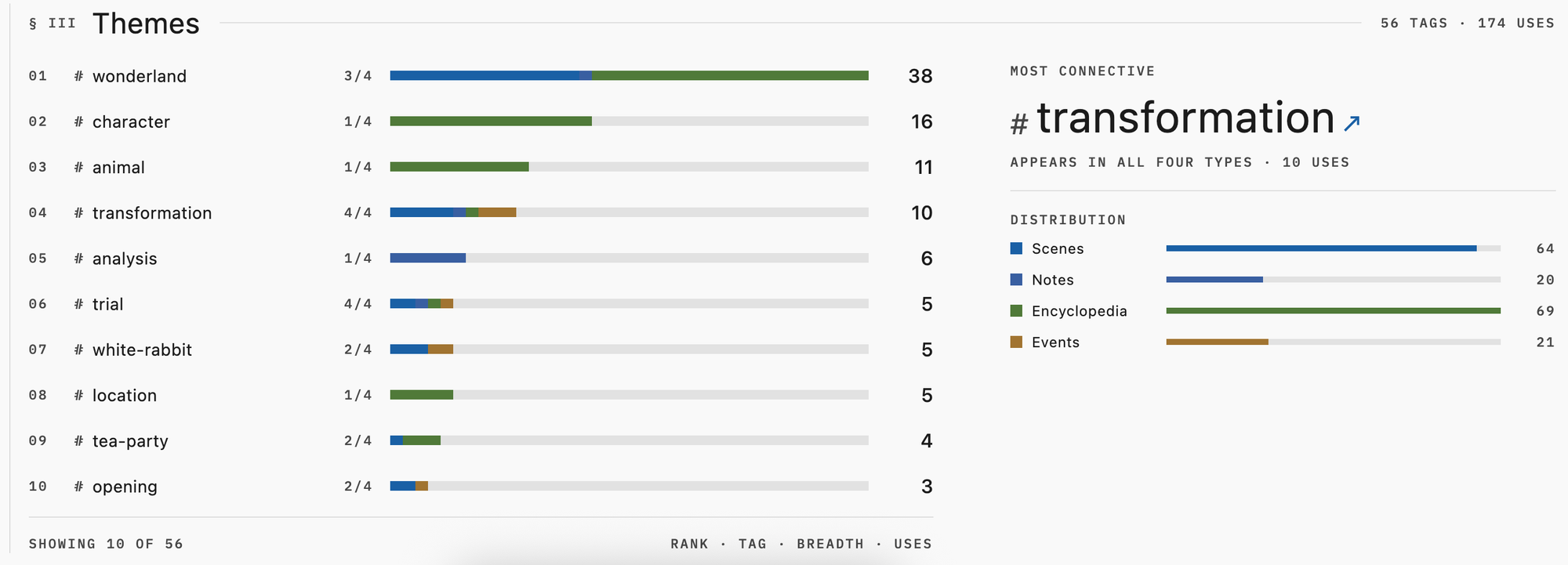
The tags can also be used to identify and track themes across chapters, and there is a section on the main dashboard that gives you an overview of them.
There are a lot of other small things that make the app great, but like I said the biggest draw for me was being able to self-host it and use it across all my devices. The next most important thing about it is that it works.
I can't say I love the UI and there are a few things that can be a bit annoying, like only a week or two ago did we get the ability to teach the dictionary new words, but for a free open-source app it is really amazing. The team is actively maintaining it and I look forward to using it more as it develops.
I definitely recommend it, even if you only want to use it as a local app that you download on one device. Visit their Github whether you want to install it on a server or find the links to download it from app stores.